Math Race or Math Speed Racing, which sum-driven racer fits you
Choose Math Race Four Arithmetic pro if you want to check sums and watch a race react, and choose Math Speed Racing Rounding 10 if you want to steer while you round numbers. The first has no steering at all, only two buttons. The second makes you swipe a car across lanes while traffic comes at you.
How an answer moves the car
Math Race Four Arithmetic pro
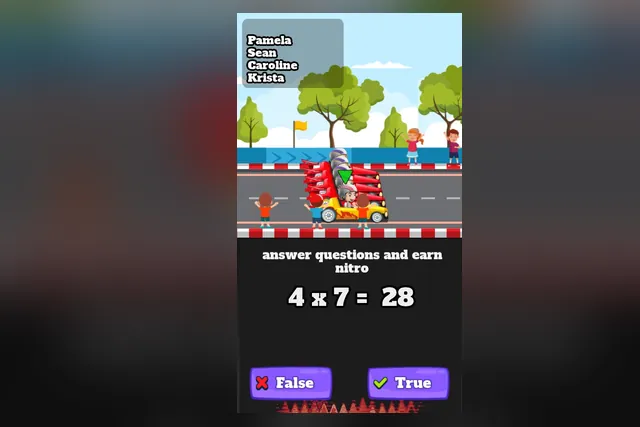
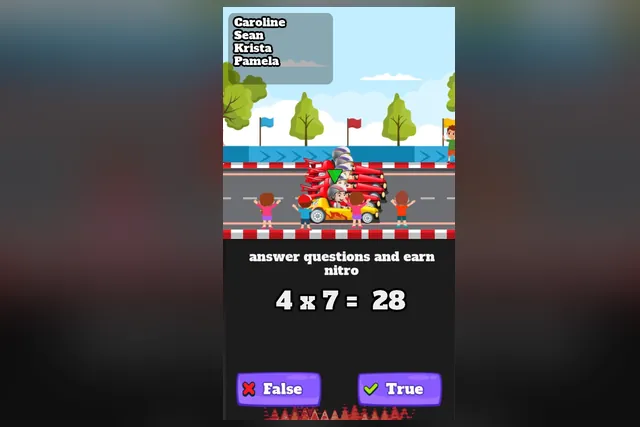
Your car is the one marked with a green arrow, and the red cars are the pack you race against. A sum appears under the line that tells you to answer questions and earn nitro, and the result is already shown. Your job is to decide whether that result is right.
Tap True on the right if it is correct, or False on the left if it is not. Then look at the track and see whether the green arrow car has moved up. The list of four names in the top left reorders as cars swap places, so it shows who is ahead.
Falling behind the red cars is how you lose a race. Every wrong tap costs you ground that a right one would have kept.
Math Speed Racing Rounding 10
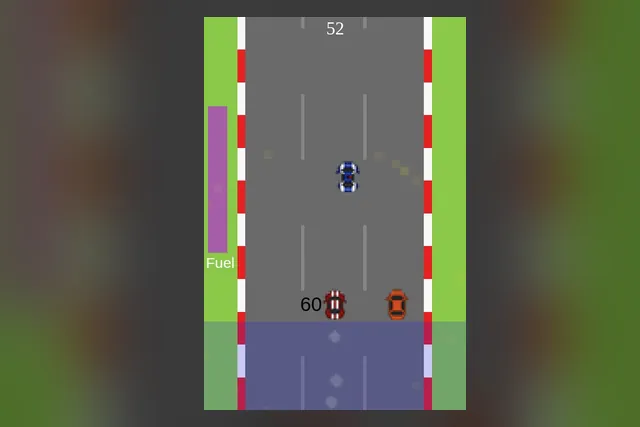
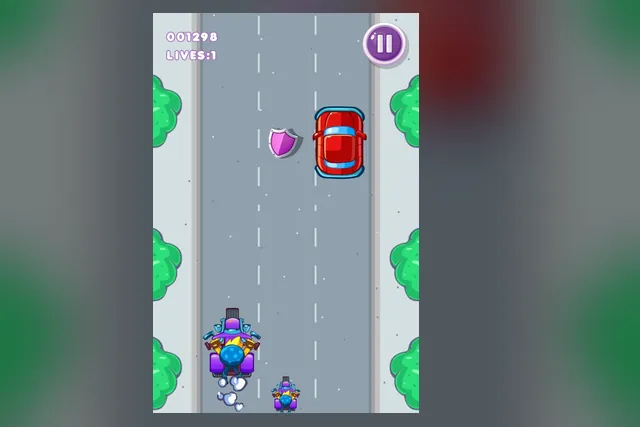
Here the answer is a lane. A number sits next to your racecar, and you round it to the nearest 10 in your head. Then you steer into the lane of the gas can that shows that rounded number.
Coins on the way give extra points. Other cars are the danger, because a crash ends the run. The purple fuel bar on the left shows how much fuel is left.
The kind of question you get
Math Race asks you to judge a finished sum. Checking comes down to working the sum quickly enough to trust it. When a product is not instant, break it into steps, such as 4 x 7 as four sevens added up.
Rounding to the nearest 10 is a smaller task, and it comes with a rule. Look at the last digit first: 5 or more rounds up to the next 10, 4 or less rounds down. Once that is automatic, the number stops being the hard part.
In the rounding game the challenge moves from the sum to the road.
Controls and pace
Taps or clicks on two large buttons are all Math Race needs. Check the answer before you tap.
Steering in the rounding game is a swipe left or right in the grey area. The car moves between lanes as you do.
- Math Race: read the sum, decide, tap, glance at the name list.
- Math Speed Racing: read the number, round it, pick a lane, dodge traffic.
Pace differs too. In Math Race you set the rhythm, one sum at a time. In the rounding game the fuel bar keeps draining, so it works as a reminder to keep answering.
Side by side
| Aspect | Math Race | Math Speed Racing |
|---|---|---|
| Input | Tap or click True or False | Swipe between lanes |
| Question | Is the shown sum right? | Round the number to the nearest 10 |
| Danger | Falling behind the red cars | Traffic and an empty tank |
| Steering | None | Lane choice and coin routes |
| Look | Dark panel, two buttons | Three-lane road |
Which one suits you
The strongest point of Math Race is the single choice on screen: one sum, two buttons, and the race responds to the answer. You always know what to do next. That makes it a good fit for a short break, because you can answer a handful of sums and see the order change without any set-up.
A longer sitting is less convincing, since the driving is entirely in the answers. If you want steering, corners or car handling, this is not that.
Beginners get a clear rule to apply in Math Speed Racing Rounding 10: look at the last digit, round, and steer. Once the rounding is automatic, the challenge becomes lane choice, coin routes and keeping clear of traffic while the fuel bar drains.
Keep an eye on the fuel bar between decisions, and treat a crash as a reason to start a fresh run.
Grab coins only when they sit on the line you are already taking. A detour for a few extra points is usually a worse trade than staying clear of traffic. Decide on your answer before the cans get close, then pick the lane.
A practical way to choose
- Pick Math Race if you want to answer calmly, with a steady run of right answers instead of a few quick guesses.
- Pick Math Speed Racing if you want to move a car, collect coins and keep an eye on the fuel bar.
- On a touch screen, the swipe area in the rounding game and the large buttons in Math Race both work with a thumb.
For a first try, open Math Speed Racing Rounding 10 if you like to be busy, and Math Race if you prefer one decision at a time. Keep whichever one feels steadier and come back to the other when you want a change.